
All Hands on Deck
Project Status
In Progress
Project type
Studio Mantasaur project
Project Duration
2.5 years
Software Used
Unity
Languages Used
C#
My Role(s)
Lead/solo programmer, Co-founder, Design help, Scrum master, Co-Business person
All Hands on Deck is a project that I started with 3 others people at university. After we graduated we decided to start a company Studio MantasaurI worked 2 years on the game as part of Studio Mantasaur. During the whole project I was the only programmer. I also helped with the design when necessary and was also part of some business talks.
Game description
All Hands on Deck is a co-op puzzle adventure game.
Combine and use various items together to solve puzzles, progress through playful worlds full of toys and save plushies.
In All Hands on Deck, all can experience the same! Just swap items and you're good to go. How handy is that!
Gameplay trailer
Mechanics/items
The game contains lots of different items with multiple uses which can often be combined with other items and create new uses. I have listed some mechanics and combinations below.
Extendable Arm + Push & pull boxes
Above you can see the Extendable arm item which can extend and rotate, this is kind of the bread and butter of All Hands on Deck. It is a unique co-op mechanic which allows player to sort of combine and become 1 thing. The push and pull boxes are also shown in the video, players can grab the handle and push and pull this. The cool thing is that the player at the end of the extendable arm can grab a handle. Thus the player holding the extendable arm can now push and pull by moving, they can still extend and retract the arm, this allows for gaps to be crossed. With the extendable arm players can also grab even handles in the air and push or pull them. They can also rotate allowing for interesting environment traversal.
Rubberband
The rubberband is a versatile item which can be used to either shoot specific items or shoot players. The rubberband is programmed fairly flexible to be able to wrap around any item while wrapped around 2 "poles" (The rubberband is wrapped around the catapult and player fingers using the same method).
Above you can see how locators (empty transforms) are used to make it wrap around items. A spline is used to wrap around the 2 "poles" a circle spline is used so we can rotate around the poles whilst maintaining a visually good look.
Activators (Button, batteries, anything that activates something)
Like many other games, All Hands on Deck has a lot of activators. These are used to activate basically anything (more on this setup in the workflow section).
Above you can see all kinds of activators, with different workings like, permanent, semi-permament, temporary, 2-players requirements, etc.
Items
Above are some of the items with unique properties, more can be read in the workflow section about how items are made.
Platforms
A lot of different platforms have been made. The functionality of these platforms can be combined, to for example create a moving and rotating platform. This is all done through rigidbodies with custom position and rotation calculations to make sure that physics objects are affected accordingly.
Systems
Items
How equipables (items) are made has been refactored multiple times over the course of the project. Until eventually I landed on the current system, which is a bit more manual intensive, but gives a lot of freedom with creating mechanics.
Most components represent a single thing that they do, here are some examples for what some components do.
Equipable.cs
EquipComponent.cs
UnequipComponent.cs
Mountable.cs
ExtendableArm.cs
Has all information about how to hold the item when equipped
If an input is pressed it will equip the item
If an input is pressed while holding the item it will unequip
Has all information about how the player should mount to this object
Manages the extension, retraction and rotation of the extendable arm (rotation could be seperated, but they were so tightly intergrated with each other that I made them 1 script)
Most components directly control player actions, for this I have created something I call a MultiBool
MultiBool usecases in PlayerMovement
1    public MultiBool IsJumpAllowed { get; set; } = new MultiBool();
2    public MultiBool IsHighFallAllowed { get; set; } = new MultiBool();
3    public MultiBool IsUnpaused { get; set; } = new MultiBool();
4
5    public MultiBool IsHandlingMovementInput { get; set; } = new MultiBool();
6    public MultiBool IsHandlingRotation { get; set; } = new MultiBool();
7    public MultiBool IsGravityEnabled { get; set; } = new MultiBool();
Multi bool in use
1    public void OnEquip(EquipBehaviour owner) {
2        owner.Player.MovementBehaviour.IsJumpAllowed.Deny(name);
3    }
4
5    public void OnUnequip(EquipBehaviour previousOwner) {
6        previousOwner.Player.MovementBehaviour.IsJumpAllowed.Allow(name);
7    }
MultiBool.cs
1    using System;
2    using System.Collections.Generic;
3
4    [Serializable]
5    public class MultiBool {
6
7        public event Action<bool> IsChanged = delegate { };
8
9        private List<string> denyingGrabIds = new List<string>();
10        private bool value = true;
11
12        public void Set(string id, bool value) {
13            if (value) {
14                Allow(id);
15            } else {
16                Deny(id);
17            }
18        }
19
20        public void Allow(string id) {
21            bool valueBeforeAllow = this;
22
23            if (denyingGrabIds == null) {
24                denyingGrabIds = new List<string>();
25            }
26
27            if (!denyingGrabIds.Contains(id)) { return; }
28            denyingGrabIds.Remove(id);
29
30            UpdateValue();
31
32            if (valueBeforeAllow != this) {
33                IsChanged.Invoke(this);
34            }
35        }
36
37        public void Deny(string id) {
38            bool valueBeforeAllow = this;
39
40            if (denyingGrabIds == null) {
41                denyingGrabIds = new List<string>();
42            }
43
44            denyingGrabIds.Add(id);
45
46            UpdateValue();
47
48            if (valueBeforeAllow != this) {
49                IsChanged.Invoke(this);
50            }
51        }
52
53        public void Undo(string id) {
54            bool valueBeforeAllow = this;
55
56            if (denyingGrabIds == null) {
57                denyingGrabIds = new List<string>();
58            }
59
60            if (!denyingGrabIds.Contains(id)) { return; }
61
62            for (int i = denyingGrabIds.Count - 1; i >= 0; i--) {
63                if (denyingGrabIds[i] != id) { continue; }
64
65                denyingGrabIds.RemoveAt(i);
66            }
67
68            UpdateValue();
69
70            if (valueBeforeAllow != this) {
71                IsChanged.Invoke(this);
72            }
73        }
74
75        private void UpdateValue() {
76            if (denyingGrabIds == null) {
77                denyingGrabIds = new List<string>();
78            }
79
80            this.value = denyingGrabIds == null || denyingGrabIds.Count <= 0;
81        }
82
83        public static implicit operator bool(MultiBool multiBool) {
84            return multiBool.value;
85        }
86
87    }
A MultiBool allows mechanics to say if something is or is not possible. This is important, since multiple things could say to the player that they can not rotate and if one of these things would suddenly say you can, then you could rotate even though you should not be able to because of the other thing denying it. MultiBools solve this problem.
Input handling
Input is handled through priority. When an object is held or in-range it can add itself to the input priority list. This way we can easily override what the jump button does, but also create input that does not eat the input and thus falls through to the next listener.
Equip Component Input Handling
1    public override void OnDiscoveredInPlayerInteractionRange(Player player) {
2        player.Input.AddInputCallbackListener(grabInput, OnGrabInput, InputPriority.PlayerHigh);
3
4        if (Equipable.HasOwner && Equipable.Owner.IsPlayer) { return; }
5
6        inputPopUpHandler.AddPlayer(player);
7    }
8
9    public override void OnLostFromPlayerInteractionRange(Player player) {
10        player.Input.RemoveInputCallbackListener(grabInput, OnGrabInput);
11
12        inputPopUpHandler.RemovePlayer(player);
13    }
Co-op progression based respawning
In a co-op game respawning is not always straight forward since there are 2 players and in AHOD there is only 1 camera, which means we can not split the camera in 2.
The respawn problem is solved with progression based respawn, which we solved by created splines that resembles the progression. Multiple splines can be used, beneath you can see a video in action with an explanation underneath.
In the video above it shows a line at the top which is the progression line. Both player positions are projected onto this line. The player closer to the start of the line is the least progressed player. If the other player happens to die, they will almost always spawn at the respawn point of the least progressed player, disabling cheesing the game.
Camera system
Cameras are hard and especially if players can not control them and you have 2 players! So we made a camera system using Cinemachine. In AHOD we have camera volumes which when players enter them will change the weight of a camera, allowing for camera blending between any number of cameras. Below is an example video where you can see 2 different cameras blending and what happens when players walk to an area without camera volume.
AHOD uses the Cinemachine target group very actively since it is a 2-player game. But it is not only used for tracking the players, it is also used to keep important objects in view. For example a target that needs to be hit or a button that is important. This allows developers to really play with the camera.
Workflow
Activators & listeners
As shown in the mechanics section at the top, their are a lot of things that activate/change state. These we call Activators.
There are even more things that do something whenever an activator changes state. These we call Listeners.
Activators are completely seperated from listeners, they do not know who is listening. Listeners on the other hand can listen to multiple activators.
Workflow of activators and listeners
As can be seen in the video, I implemented a scene view object picking mode, so you do not have to search through the hierarchy to find the right object. You can just click it in the scene view. This is re-used throughout the project, for example if you wanna pick you spawn point in the editor, you can just click it in the scene.
I believe using the spatial awareness of people using the tool is an amazing thing to do, as opposed to listing all spawnpoints in a list.
Ofcourse lists are still great, but if you know the layout of the level (which can be learned through having a quick look) then it is so much easier to just click where you want to respawn instead of trying to learn the spawnpoint names.
Scriptable objects
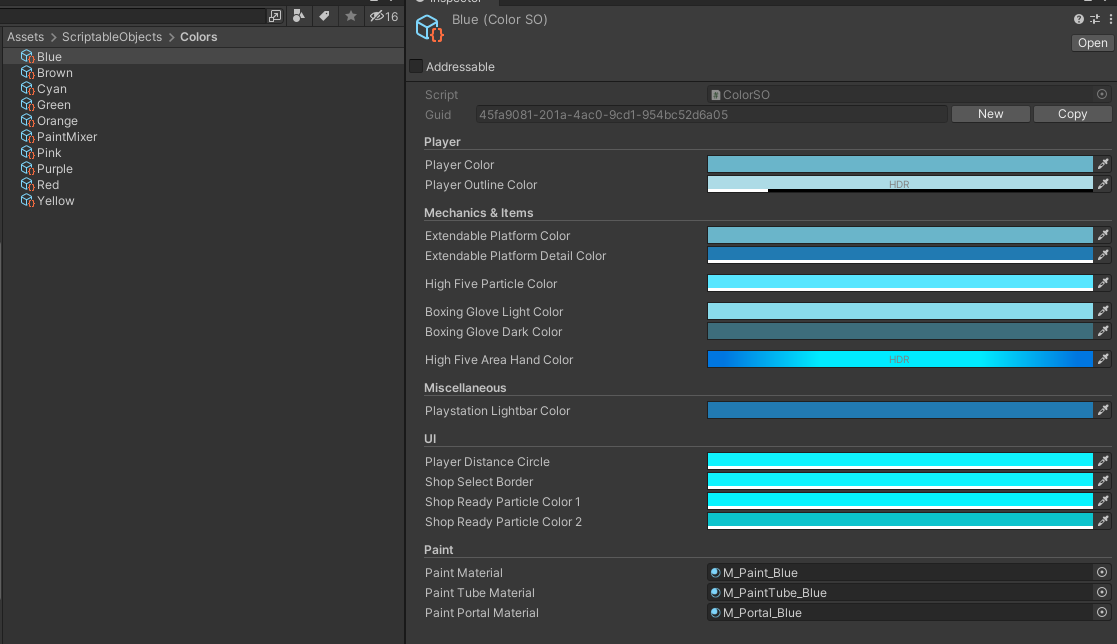
In AHOD I prefer to heavily use ScriptableObjects for data management. Colours play a big role in AHOD here are 5 colours that change when a player has changed their colour in the shop, for example:
- Playstation lightbar colour
- Extendable arm platform colour
- Inventory UI colour
- High five particle colour
- Player outline colour
Inspector of a ColourSO
There are a lot more uses for ScriptableObjects inside AHOD, to name some:
- Haptic feedback presets
- Collision sounds based on materials
- ObjectPools
- Tutorials
- GUIDS for saving
Multi scene workflow
AHOD uses a multi-scene workflow, making scenes less cluttered and more easily editable.
Example of how multiple scenes are used
Tools
I love creating tools and increasing the efficieny and friendlyness of tasks.
QoL tools
I created a lot of small QoL bits and bops that when added together make the workflow a lot better and friendlier to do. I will list some of the most often used tools/shortcuts.
Most of these are pretty easy to implement and it makes the creation experience much easier and efficient.
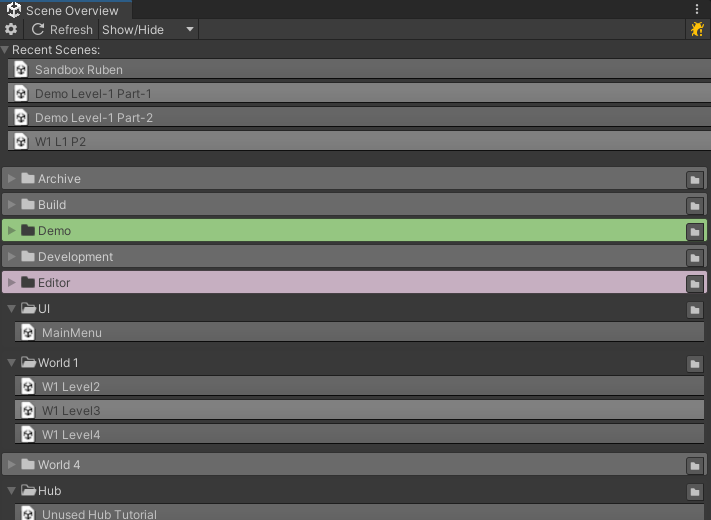
Scene overview window
I created a scene overview tool, this way you can quickly load scenes. Including recent scenes, which is the most used feature of this window, since you most of the time only load the 3-5 same scenes in a day.
Scene overview window
Ninetile tool
For this project I also made a nine tile editor tool, which allows developers to easily create modular platforms. And although I do call it the nine tile editor, it has the option to add parts to the creation process, like seen in the video with for example the railings on top of the platforms.
Showcase of Nine Tile tool in editor
The nine tile editor also does not care about where artists put their pivot, since all the calculations are based on the mesh bounds. This means that artists won't ever have exported a pivot wrong that needs to be fixed.
Waterfall tool
There are a lot of different waterfall in different sizes in AHOD, so I made a tool that resembles the boxcollider editor to editor waterfall. You can even change the kind of waterfall used. This does not just swap meshes, but it swaps the whole prefab out for another one. This allowed me to put different functionality on different kind of waterfalls easily.
Showcase of waterfall editor
NPCs Dialogue nodegraph
I created a custom dialogue node graph which needed to just do the basic stuff, but be pretty modular. That is why every node just does one thing, you can mix and mash, creating complex dialogues with simple functionality.
Dialogue graph for NPCs
One thing I am pretty proud in this graph is the animator node UI. It lists all the parameters so developers do not have to type parameter names every time.
Animation Node UI
Online multiplayer
Since AHOD is a co-op game, online multiplayer is almost a must these days. Because of this I have expiremented a lot with giving AHOD the online multiplayer experience it deserves. Sadly always was a big leap to go from offline to online with such a big project. The main problem being, that I am the only programmer, meaning that development of all other features just flat out stops. This hindered the development process so much, that we had to give up on the idea.
However I have made 2 different online versions, one using Photon and one using Mirror. Although my online multiplayer experience is fairly limit, I feel fairly confident in working with either Mirror or Photon.